
Fake QR Code Scams: How to Spot, Avoid, and Report Them in 2026

Fake QR code scams work by overlaying fraudulent codes on legitimate ones or sending malicious QR codes via email and text. You can spot them by checking for sticker overlays, previewing the URL before tapping, and verifying the source. If you've already scanned one, disconnect from the internet immediately, run a malware scan, and contact your bank.
What Are Fake QR Code Scams (Quishing)?
Fake QR code scams, increasingly called "quishing" (QR + phishing), happen when criminals create counterfeit QR codes that redirect you to fraudulent websites, trigger malware downloads, or steal payment information. The scammer either physically places a fake sticker over a real QR code or sends one digitally through email, text messages, or social media.
Unlike traditional phishing where you can hover over a link to preview the URL, QR codes hide their destination completely. Your phone's camera reads the encoded data and opens whatever URL is embedded. That opacity is exactly what makes quishing so effective.
The mechanics are straightforward. A criminal generates a QR code pointing to a phishing site that mimics a bank login, parking payment portal, or Wi-Fi authentication page. They print it on a sticker and place it over the legitimate code at a restaurant, parking meter, or bus stop. When you scan it, you see what looks like a normal website and enter your credentials or payment details. The scammer captures everything.
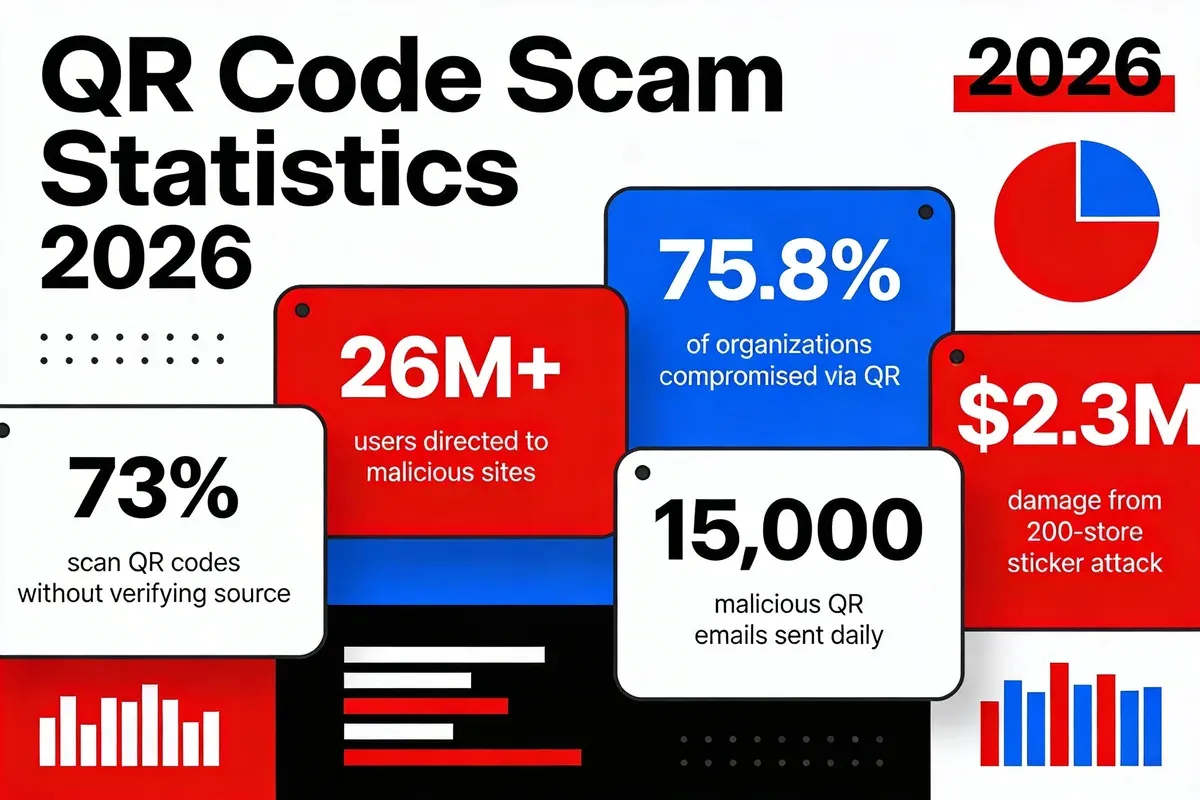
According to CNBC's cybersecurity report, 73% of Americans scan QR codes without any verification. That's nearly three out of four people trusting a code blindly.
6 Common Types of QR Code Scams in 2026
QR code scams come in several distinct forms, each targeting different scenarios where people naturally trust codes. Here are the six most common types I've tracked through our platform's abuse reports and industry research.
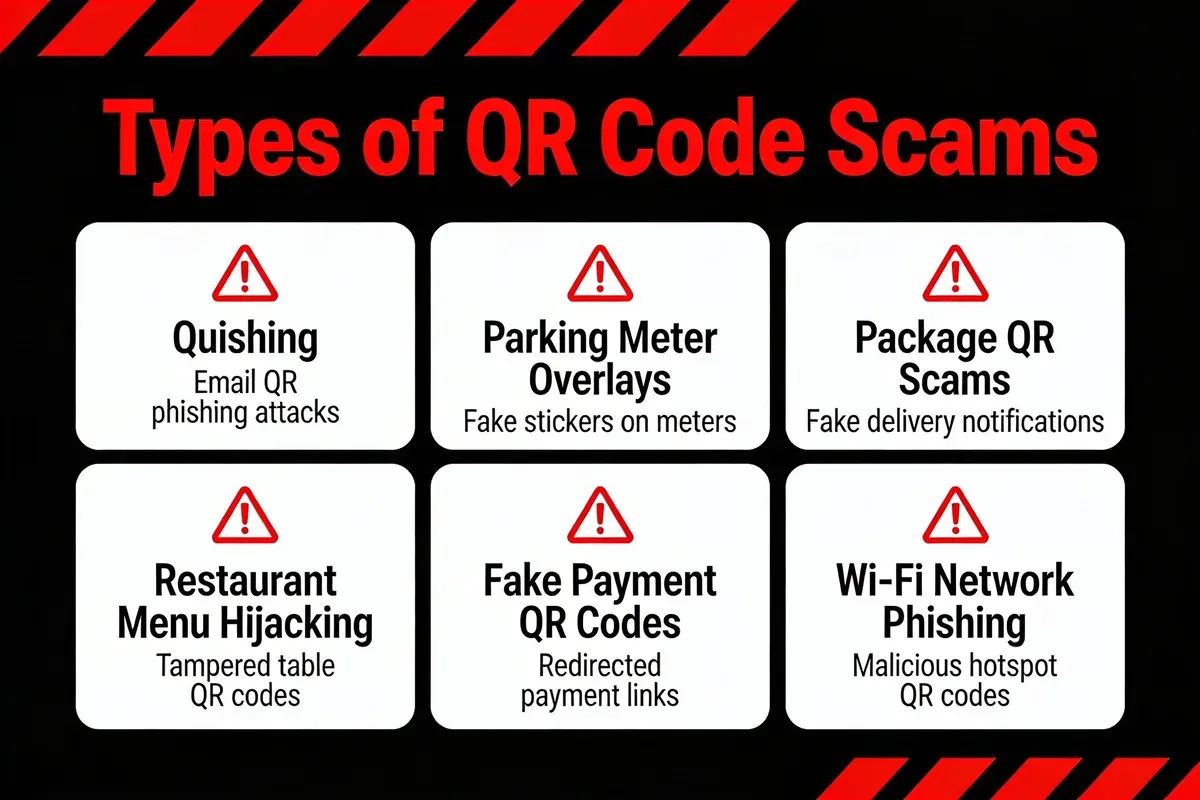
1. Parking Meter Overlay Scams
Criminals stick fake QR codes directly over legitimate ones on parking meters and payment kiosks. When you scan to pay for parking, you're redirected to a convincing clone of the real payment site. You enter your card details, the scammer captures them, and you still get a parking ticket because you never actually paid.
New York City's Department of Transportation issued a public warning that scammers were posting fake QR codes on parking meters across the city, according to CNBC. This wasn't a small operation. Similar attacks hit Austin, Texas, and multiple UK cities during 2025.
2. Email Quishing Campaigns
Attackers embed QR codes in emails that impersonate banks, delivery services, or IT departments. The email tells you to "scan to verify your account" or "scan to track your package." Because the QR code is an image rather than a clickable URL, it bypasses most email security filters that scan text-based links.
According to IronScales citing Microsoft's threat data, 15,000 emails containing malicious QR codes target the education sector daily. Schools and universities are particularly vulnerable because students routinely scan QR codes for assignments, campus events, and dining.
3. Package Delivery Scams
A package arrives at your door with a QR code and a note saying "Scan for delivery details" or "Scan to confirm receipt." The FTC warned consumers about scanning QR codes on unexpected packages, as reported by CNBC. These codes typically lead to phishing sites requesting personal information or installing tracking malware on your phone.
The scam works because people are curious. You didn't order anything, but here's a package. The QR code feels like the fastest way to figure out what it is. That curiosity is the attack vector.
4. Restaurant Menu Hijacking
Since COVID-19 normalised QR code menus, restaurants have become prime targets. Scammers replace table-top QR codes with fakes that redirect to cloned menu sites with built-in payment skimmers. You think you're ordering food. You're actually handing over your card details.
I've seen this first-hand through QRCode.co.uk customers. A restaurant chain in Manchester discovered tampered codes on 12 tables after customers reported suspicious charges. The fake site looked almost identical to their legitimate ordering system.
5. Fake Payment QR Codes
This type targets peer-to-peer and point-of-sale transactions. Scammers display their own QR code at charity collection points, market stalls, or self-checkout areas. The code links to the scammer's payment account instead of the legitimate merchant's. According to Keepnet Labs' analysis, fake QR code stickers placed over legitimate ones at 200 store locations caused a 15% drop in legitimate scans and $2.3 million in total damage.
6. Wi-Fi Network Phishing
QR codes that promise free Wi-Fi access at cafes, airports, and hotels instead connect you to a rogue network controlled by the attacker. Once connected, they can intercept your browsing data, capture login credentials, and inject malware into unencrypted connections. Some sophisticated versions create a "captive portal" that asks for your email and password before granting access.
Warning Signs of a Fake QR Code
Spotting a fake QR code before scanning it is your strongest defence. These warning signs split into two categories: physical indicators you can see with your eyes, and digital red flags that appear after scanning.
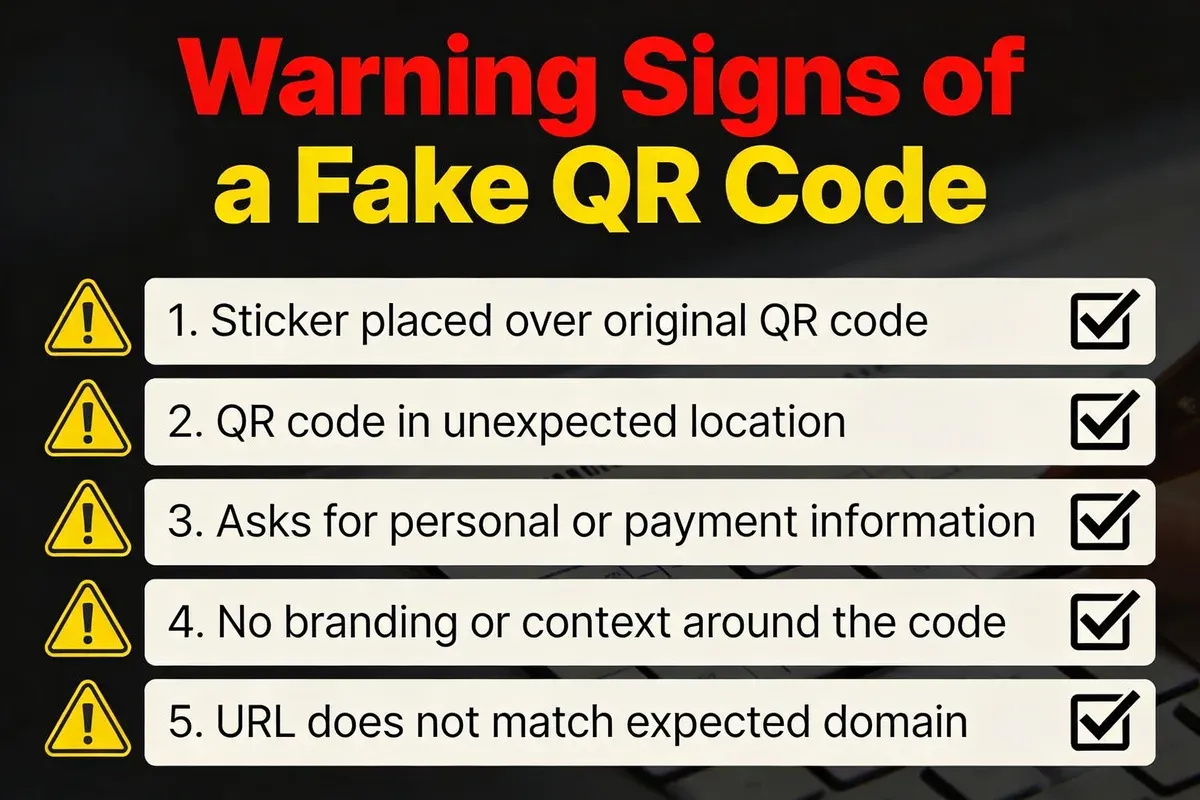
Physical Warning Signs
- Sticker overlays: Feel the surface. Legitimate QR codes are printed directly on signs, menus, or posters. If you feel a raised edge or a sticker layer sitting on top of another code, someone tampered with it.
- Misalignment or poor print quality: Scam stickers often don't perfectly align with the surrounding design. Look for crooked placement, colour mismatches, or blurry printing that doesn't match the rest of the material.
- Damage or wear inconsistency: If the sign looks weathered but the QR code looks brand new, that code was likely placed recently and isn't original.
- Multiple codes in one location: Two QR codes next to each other or one partially covering another is a clear sign of tampering.
- Unexpected locations: QR codes taped to ATMs, stuck on public benches, or posted on lamp posts should raise immediate suspicion. Legitimate businesses place codes on their own property and marketing materials.
Digital Warning Signs
- URL doesn't match the brand: After scanning, check the URL in your browser bar before entering any information. A parking meter in London shouldn't redirect to a domain registered in a foreign country. Learn to check QR code safety before interacting with any scanned page.
- Immediate requests for personal data: Legitimate QR codes rarely ask for passwords, national insurance numbers, or full card details immediately after scanning.
- Unexpected download prompts: If scanning triggers an app download or file installation, close the browser immediately. Legitimate QR codes direct to websites, not downloads.
- Missing HTTPS: The destination URL should start with https://. If it's plain http:// or has a suspicious certificate warning, don't proceed.
- Shortened or obfuscated URLs: While some legitimate QR codes use URL shorteners, a series of random characters in the domain is a red flag. You can extract links from QR codes using dedicated tools to inspect the destination before visiting it.
Research published by NDSS (Network and Distributed Systems Security Symposium) found that 67% of participants opened the link embedded in a QR code without inspecting the URL for phishing cues. That number tells you how effective even basic awareness can be. Simply pausing to look at the URL puts you ahead of two-thirds of people.
What to Do If You Scanned a Fake QR Code
If you've scanned a suspicious QR code and entered information or noticed something wrong, you need to act fast. These six steps minimise damage and protect your accounts.
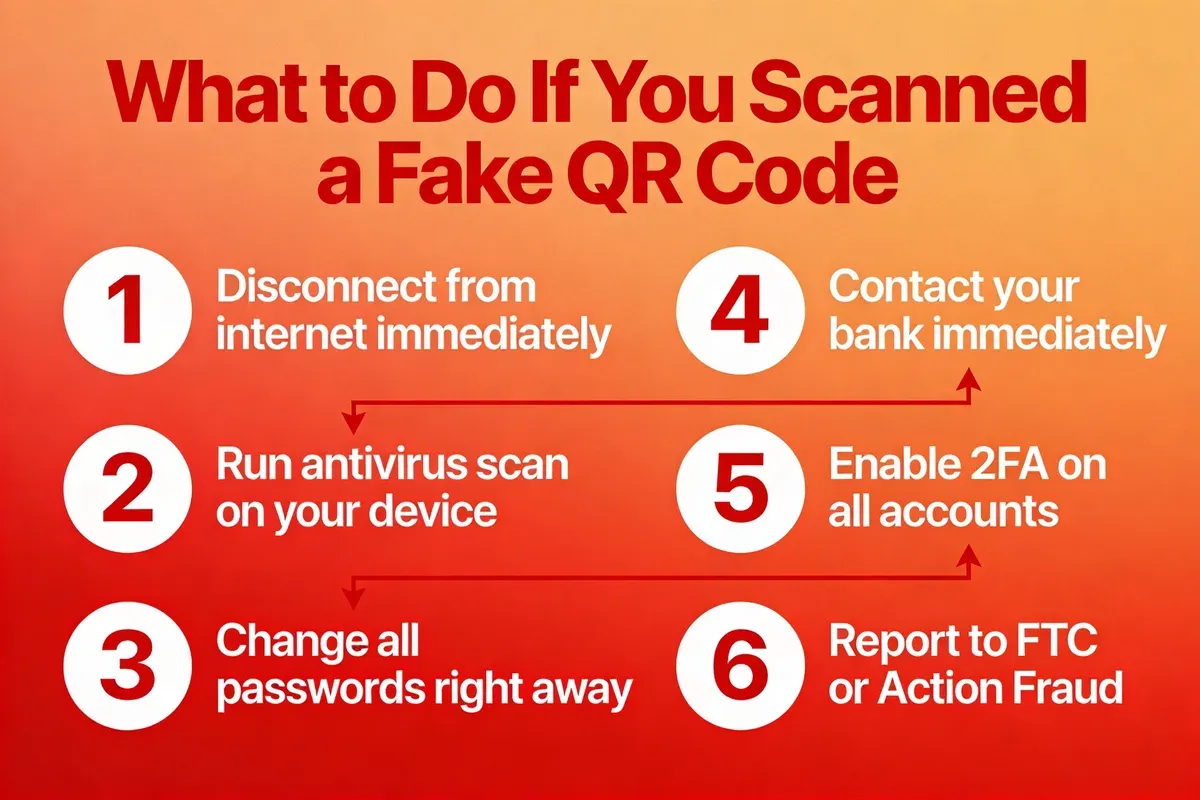
Step 1: Disconnect Your Device from the Internet
Switch your phone to aeroplane mode. This severs all network connections instantly and prevents any background data transfer. If the malicious site was loading scripts or attempting downloads, cutting the connection stops those processes mid-transfer.
You'll know it's working when: Your phone shows no Wi-Fi or mobile data icons, and any open web pages stop loading.
Step 2: Run a Full Malware Scan
Before reconnecting, install a reputable mobile security app (if you don't already have one) and run a complete device scan. Both iOS and Android have free, trusted options from vendors like Malwarebytes and Bitdefender.
Watch out for:
- Skipping the scan because "nothing happened": Some malware operates silently in the background. A scan that comes back clean gives you confidence; skipping it leaves you guessing.
- Using an unfamiliar antivirus app from a search result: Stick to well-known security vendors. Ironically, searching "free antivirus" after a scam can lead you to more malware.
Step 3: Change Compromised Passwords Immediately
If you entered login credentials on the phishing site, change those passwords right now. Start with the compromised account, then change the password on any other account that uses the same credentials. Enable two-factor authentication (2FA) on every account that supports it.
Pro tip: In my experience running QRCode.co.uk's security advisories, the biggest damage from quishing comes from password reuse. One set of stolen credentials often unlocks multiple accounts. Use a password manager and never reuse passwords across services.
Step 4: Contact Your Bank or Card Provider
If you entered any payment information, call your bank immediately. Don't wait. Request a temporary card freeze and ask them to flag any transactions made after the time you scanned the code. Most UK banks have 24/7 fraud lines. For credit cards, you're typically protected under Section 75 of the Consumer Credit Act for amounts over 100 GBP.
Step 5: Monitor Your Accounts for 90 Days
Set up transaction alerts on all financial accounts. Check your credit report for unexpected inquiries or new accounts. Some scammers sit on stolen data for weeks before using it, so a clean bill immediately after the incident doesn't mean you're safe.
Step 6: Report the Incident
Reporting fake QR codes helps authorities track scam networks and warn other potential victims. See the full reporting details in the "How to Report QR Code Scams" section below.
How to Protect Your Business from QR Code Scams
If you run a business that uses QR codes for payments, menus, or marketing, you have a responsibility to protect your customers. Here's what actually works based on what I've seen across thousands of QR code deployments through our platform.
Use Dynamic QR Codes Instead of Static Ones
Static QR codes embed a fixed URL directly in the code pattern. Once printed, you can't change or monitor them. Dynamic QR codes route through a managed redirect, which means you can track scans, change the destination URL, and spot anomalies.
At QRCode.co.uk, we provide scan analytics that show you exactly when, where, and how often your codes are scanned. If a code suddenly starts getting scans from unexpected locations, that's a signal someone may have duplicated or tampered with it.
Regularly Inspect Physical QR Code Placements
Train your staff to physically check QR codes at your premises at least weekly. Run a fingernail across the code's surface. If there's a sticker overlay, you'll feel the edge. Make this part of your opening routine alongside checking fire exits and POS systems.
Brand Your QR Codes
Generic black-and-white QR codes are easy to counterfeit. Branded codes with your logo, colours, and distinctive design patterns are much harder to replicate convincingly. They also make it obvious to customers when a replacement code doesn't match your branding. Our password-protected QR code generator adds another security layer for sensitive links.
Educate Your Customers
Place a small notice near your QR codes: "Our QR codes are printed directly on this surface. If this code appears to be a sticker, please alert staff." This simple step turns your customers into an early warning system.
According to Sharp's 2026 phishing report, nearly 70% of businesses expect to experience a phishing attack in the next 12 months. Proactive customer education reduces your exposure significantly.
Monitor and Update
Check your QR code security statistics regularly. Track scan volumes for anomalies. If a code that normally gets 50 scans per week suddenly shows 500, investigate. Dynamic QR codes make this monitoring possible. Static codes give you zero visibility.
Real-World QR Code Scam Cases
These aren't hypothetical scenarios. These are documented incidents that caused real financial damage and exposed thousands of people's personal data.
NYC Parking Meter Attack
New York City's Department of Transportation publicly warned residents about fake QR codes appearing on parking meters across the five boroughs. Scammers placed stickers over legitimate payment codes that redirected drivers to a convincing parking payment clone site. Victims entered card details expecting to pay for parking. The city had to physically audit thousands of meters and issue public safety advisories through local news.
200-Store Sticker Attack (Keepnet Labs Report)
In one of the largest documented QR scam operations, attackers placed counterfeit stickers over legitimate QR codes at 200 retail locations. According to Keepnet Labs, the campaign caused $2.3 million in total damage and reduced legitimate scan rates by 15% as consumers lost trust in in-store codes. The operation ran for weeks before retailers identified the pattern.
Education Sector Targeting (Microsoft Data)
Microsoft's threat intelligence team documented that 15,000 malicious QR code emails target educational institutions daily, as reported by IronScales. These emails impersonate university IT departments, student loan providers, and campus services. Students scan the embedded QR codes expecting to access grades, financial aid, or campus Wi-Fi. Instead, they land on credential harvesting pages.
According to Osterman Research cited by IronScales, 75.8% of organisations have been compromised by image-based and QR code phishing attacks over the past 12 months. That's more than three-quarters of all organisations surveyed.
26 Million People Lured to Malicious Sites
According to TechDigest reporting on NordVPN research, over 26 million people have been directed to malicious websites through deceptive QR codes. The same research found that 73% of Americans admitted scanning QR codes without verifying their legitimacy.
"QR codes have become a silent gateway for cybercriminals." — Marijus Briedis, Chief Technology Officer at NordVPN
The global cost of cybercrime underscores why these attacks are proliferating. According to TitanHQ's phishing cost analysis, the cost of cybercrime to the global economy has reached $10.5 trillion annually. QR code scams represent a fast-growing slice of that total.
Academic Research: Why People Fall for It
A peer-reviewed study published by researchers on arXiv conducted a real-world phishing campaign with two QR code variants at a research campus. Their findings: professionally designed QR codes received significantly more scans, and users were more likely to interact with QR codes simply because of the "easy functionality" they offered. The study confirmed that design quality directly influences trust. A well-made fake QR code is more dangerous than a poorly made one.
The NDSS research reinforced this: 67% of participants opened QR-embedded links without inspecting the URL. These aren't careless people. They're people who've been trained by years of legitimate QR code use to scan first and ask questions later.
How to Report QR Code Scams
Reporting a QR code scam takes five minutes and helps law enforcement track criminal networks. Here's where to report based on your location.
What to Include in Your Report
- Photos of the QR code: Take a picture of the physical code and its surroundings before it gets removed. This helps investigators identify patterns across locations.
- The URL it redirected to: Copy the full URL from your browser history if possible. If you used an app that logged the scan, export that data.
- Date, time, and location: Be as specific as possible. Exact addresses help authorities check for similar reports in the area.
- What information you entered: Tell the investigating officer exactly what data the phishing site collected. This helps them assess the severity and advise on next steps.
- Any financial impact: If you've lost money, provide transaction details. This strengthens the case and may help with recovery through your bank.
Also notify the business where you found the fake code. If it was at a restaurant, shop, or car park, the staff need to know so they can remove the sticker and protect other customers.
For UK businesses specifically, you should also review the NCSC's guidance on QR code risks to understand your obligations around customer data protection.
How to Verify a QR Code Is Safe Before Scanning
Prevention works better than recovery. These practical steps take seconds and can save you from hours of damage control.
Use Your Phone's Built-In QR Preview
Both iOS and Android show a URL preview when you point your camera at a QR code. On iPhone, the link appears in a banner at the top of the screen. On most Android devices, it shows at the bottom. Read the full URL before tapping it. If the domain looks unfamiliar or doesn't match the context, don't open it.
Use a Security-Focused QR Scanner App
Several apps check the destination URL against known phishing databases before opening it. These scanners flag malicious URLs and warn you before your browser loads the page. This adds an extra layer of protection beyond the basic camera preview. Check our guide on how to scan QR codes safely for specific app recommendations.
Check for HTTPS and Domain Legitimacy
After scanning, look at the URL in your browser's address bar. A legitimate parking payment site for a London borough will have a .gov.uk domain, not a random .com with extra characters. If the URL contains misspellings of known brands (like "amazzon" or "paypa1"), close the tab immediately.
Never Enter Sensitive Information from a QR Code Link
This is the simplest rule and the most effective. If a QR code takes you to a page requesting passwords, payment details, or personal identification, stop. Navigate to the service directly by typing the URL yourself or using the official app. Legitimate organisations don't require you to enter sensitive data through a QR code redirect.
For businesses looking to understand the broader adoption patterns, our QR code adoption across industries report covers how different sectors are handling security challenges.
QR Code Safety Tools and Resources
| Resource | Type | What It Does | Cost |
|---|---|---|---|
| QRCode.co.uk | QR Code Generator | Dynamic codes with scan analytics, custom designs, and instant link updates | Free basic / Paid plans |
| VirusTotal | URL Scanner | Checks URLs against 70+ antivirus engines and blocklists | Free |
| FTC Consumer Alert | Government Advisory | Official guidance on QR code scam prevention | Free |
| NCSC QR Code Guide | Government Advisory | UK National Cyber Security Centre risk assessment | Free |
| Malwarebytes Mobile | Mobile Security | Scans devices for malware installed via malicious QR codes | Free / Premium |
Frequently Asked Questions
How can you tell a fake QR code?
What should I do if I scanned a fake QR code?
Can someone steal your information from a QR code?
What are the main types of QR code scams?
How do I report a suspected QR code scam?
Are QR codes safe to scan in 2026?
Protect Yourself and Your Business
Fake QR code scams aren't going away. With over 26 million people already redirected to malicious sites and attacks targeting everything from parking meters to university email, the threat is real and growing. But the defences are straightforward: check for sticker overlays, preview URLs before tapping, never enter sensitive data through QR code links, and report suspicious codes.
For business owners, the priority is clear. Switch to dynamic QR codes that you can monitor, brand your codes so counterfeits are obvious, and train staff to check physical placements regularly. These steps cost almost nothing compared to the reputational and financial damage of a scam affecting your customers.
If you're creating QR codes for your business, start with a free QR code generator that gives you scan analytics and the ability to update links instantly. I built QRCode.co.uk specifically to give small businesses these protections without complexity or high costs.
For a deeper look at QR code payment security trends, check our QR code payment statistics report. And if you're evaluating whether free QR tools are secure enough for your needs, read our guide to QR code generator safety.