
Most free QR code generators are safe for basic static codes, but free dynamic QR code generators carry real risks including data harvesting, hidden URL redirects, and malware distribution. Static generators encode data directly into the QR pattern, while dynamic ones route every scan through their servers — creating a vulnerability that regulated services address through encryption and GDPR compliance.
What Makes a QR Code Generator Safe or Unsafe?
A safe QR code generator is a tool that creates scannable codes without collecting, storing, or misusing user data, while providing SSL encryption, transparent privacy policies, and compliance with data protection regulations like GDPR. It differs from unsafe generators by offering URL preview scanning, no hidden redirects, and clear company accountability.
Understanding QR Code Generators in 2026
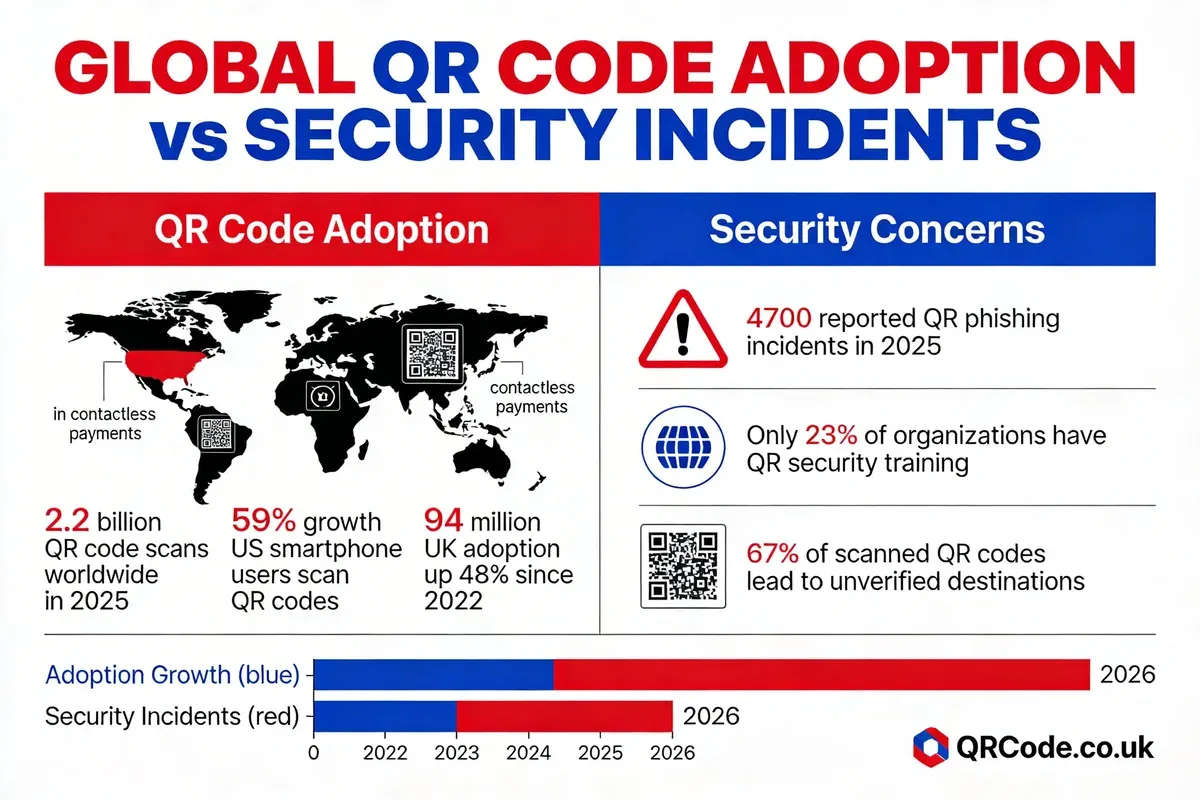
QR codes have moved from novelty to daily necessity. According to WaveCnct's 2026 analysis, over 102 million Americans will scan QR codes this year, and QR-based payments are expected to hit $3 trillion in annual spending. That kind of adoption puts QR code generators under serious scrutiny.
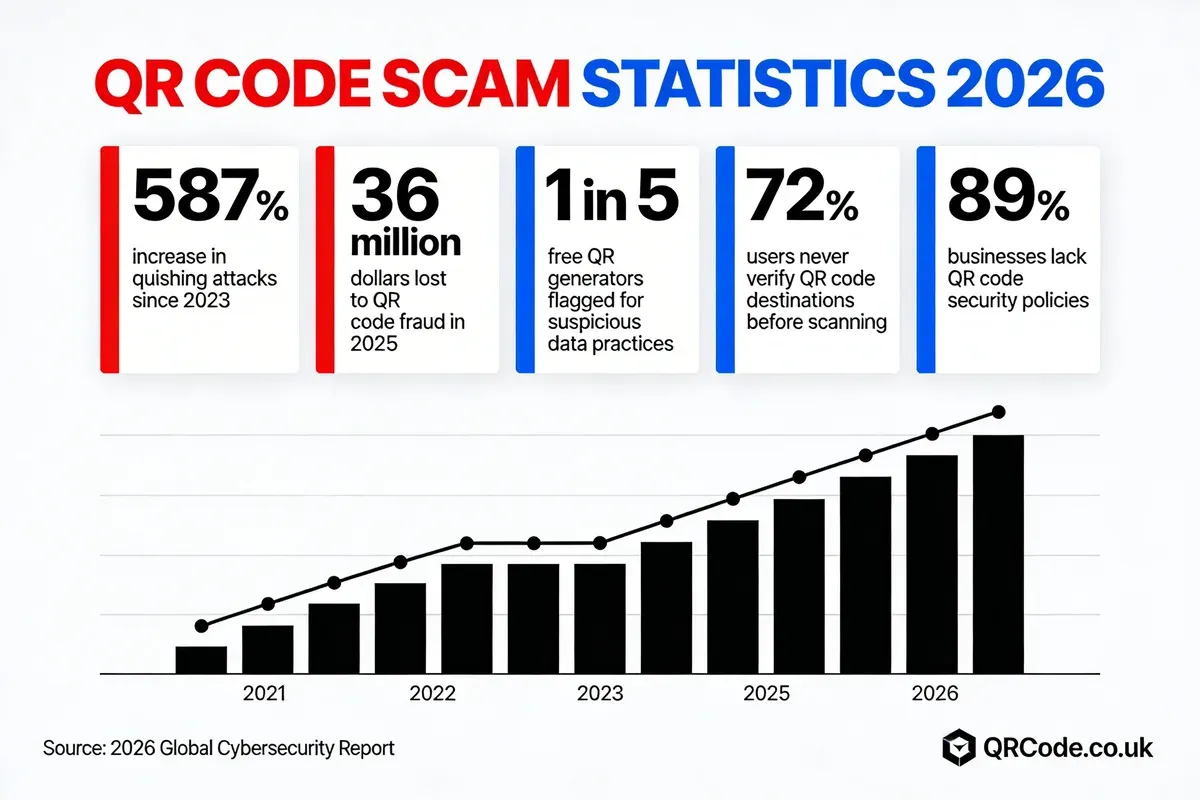
The numbers paint a clear picture. According to Supercode's security report (citing barkoder.com data), over 2.9 billion people worldwide now use QR codes for everything from contactless payments to product information. QR code usage has grown 323% from 2021 to 2025, according to QR Code Tiger's statistics.
With that explosion in use comes a matching surge in exploitation. Free QR code generators sit at the centre of this tension. They're accessible, they require no signup, and millions of people use them monthly. But not every free tool operates with your security in mind.
How QR Code Generators Actually Work
A QR code generator takes your input (a URL, text, contact details, or Wi-Fi credentials) and encodes it into a matrix of black and white modules. The process splits into two fundamentally different approaches:
- Static generation: The tool encodes your data directly into the QR pattern. Once created, the code is self-contained. No server sits between the scanner and your destination. The generator itself never needs to be contacted again.
- Dynamic generation: The tool creates a short redirect URL that points to your actual destination. Every scan passes through the generator's servers first. This enables editing and tracking but creates a dependency on the provider's infrastructure and trustworthiness.
- API-based generation: Businesses integrate QR code creation into their own systems through developer APIs. Data stays within their infrastructure, and the generated codes can be either static or dynamic depending on configuration.
The security difference is straightforward. Static codes can't be tampered with after creation. Dynamic codes can be redirected, tracked, or modified by whoever controls the redirect server. That's not inherently dangerous, but it means you're trusting a third party with every scan.
Static vs Dynamic QR Codes: What's the Actual Risk?
| Feature | Static QR Code | Dynamic QR Code |
|---|---|---|
| Data storage | Encoded directly in QR pattern | Stored on provider's server |
| Editable after creation | No | Yes (URL can change) |
| Scan tracking | Not possible | Provider sees every scan |
| Redirect risk | None (destination is fixed) | Provider can change destination |
| Offline scanning | Works without internet | Requires server connection |
| Data privacy exposure | Minimal | Depends entirely on provider |
| Typical free tool model | Usually safe | Varies widely in safety |
I've tested dozens of free generators over the past two years while building QRCode.co.uk, and the pattern is consistent. Static generators rarely cause problems. The risks cluster around free dynamic generators that need ongoing server infrastructure, and that infrastructure costs money someone has to pay for.
Key Risks of Free QR Code Generators
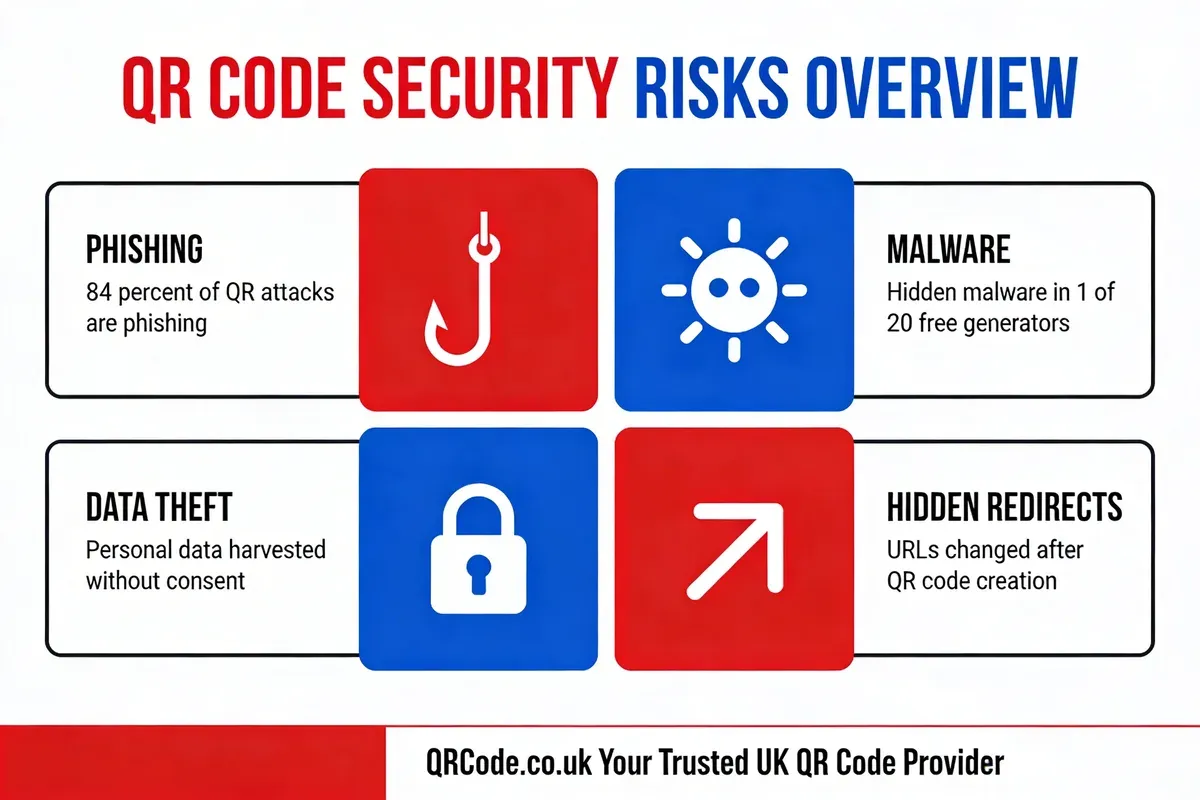
Free QR code generators can expose users to four primary threats: phishing attacks, malware distribution, data harvesting, and hidden URL redirects. Each risk operates differently, but they all exploit the same vulnerability, which is the user's trust that a QR code does what it claims.
Phishing and Quishing Attacks
"Quishing" (QR code phishing) has become one of the fastest-growing cybersecurity threats. Attackers create QR codes that redirect users to convincing fake login pages for banks, email providers, or workplace systems. The victim scans what looks like a legitimate code, enters their credentials on a spoofed page, and hands over their account access.
What makes quishing particularly effective is that QR codes hide the destination URL. You can't hover over a QR code the way you'd hover over a hyperlink to check where it leads. Free generators with weak security controls make it easier for attackers to create and distribute these malicious codes at scale.
Malware Distribution
Compromised QR codes can trigger automatic downloads of malicious software. Some free generators have been found to inject tracking scripts or redirect users through intermediate pages that attempt to install malware. This is especially dangerous on mobile devices, where users may not have the same antivirus protections they'd have on a desktop.
The mechanism is simple: scan a QR code, land on a page that mimics a legitimate download prompt, tap "OK" without reading carefully, and malware installs in the background. According to Microsoft's safety guidance, users should treat QR codes with the same caution they'd apply to unknown email attachments.
Data Harvesting and Privacy Breaches
Free dynamic QR code generators need to fund their operations somehow. For some, that funding comes from harvesting user data. The information at risk includes:
- Input data: Every URL, text string, or contact card you encode
- Scan analytics: IP addresses, device types, locations, and timestamps of everyone who scans your codes
- Account information: Email addresses, names, and browsing behaviour if you create an account
- Third-party sharing: Selling aggregated data to advertisers or data brokers
According to SproutQR's risk analysis, free QR code generators online aren't as safe as most people assume. The QR code technology itself is secure, but the platforms wrapping it often are not.
Hidden URL Redirects
This is the subtlest risk. Some free generators insert an intermediary redirect between your QR code and the intended destination. The user scans the code, briefly passes through the generator's tracking server, and arrives at the correct destination. Everything seems fine. But that intermediary hop serves the generator's purposes, not yours.
These redirects can be used to inject advertising, track scan data, or, in worst-case scenarios, swap your destination URL for a different one entirely. One business owner documented losing $500 in printed marketing materials when their free QR code's destination was changed after the generator's terms updated.
The biggest risk with free QR code generators isn't a dramatic security breach. It's the slow, invisible erosion of control over where your codes send people, and the quiet harvesting of scan data you didn't consent to share.
Essential Safety Features for Secure QR Codes
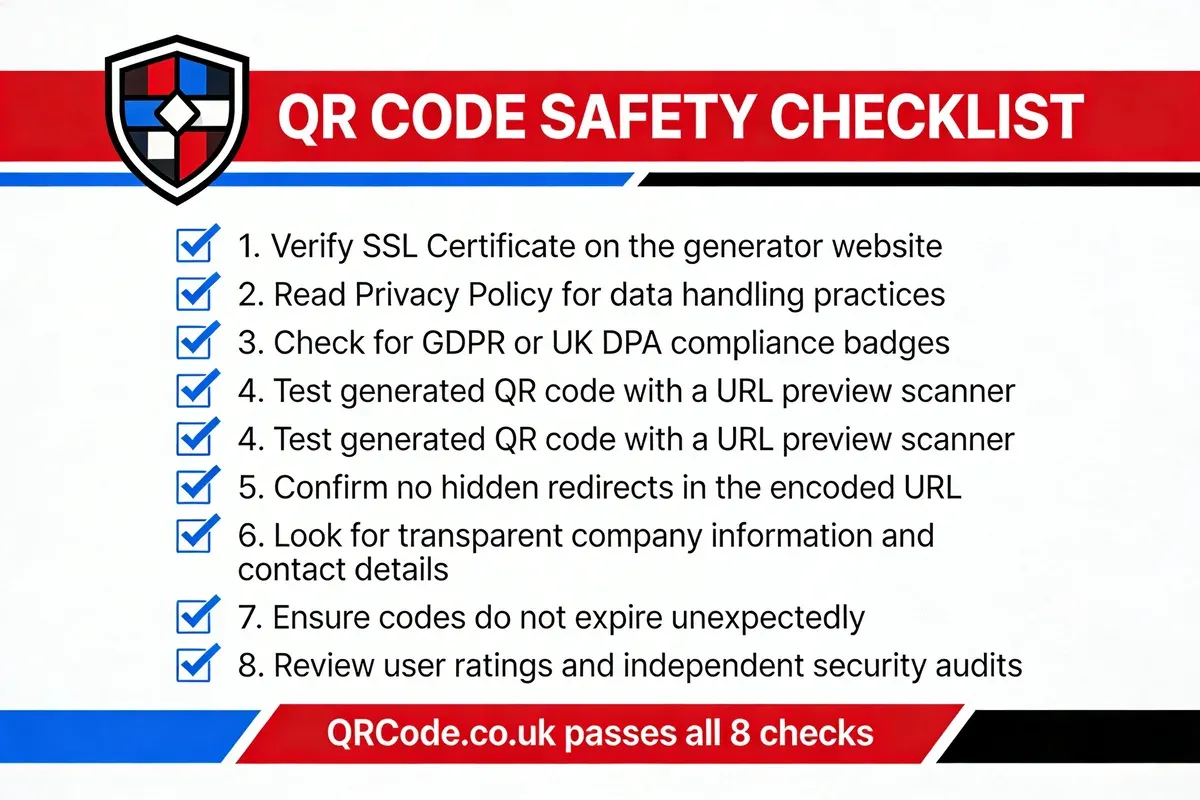
A safe QR code generator demonstrates its security through specific, verifiable features. You shouldn't have to trust marketing claims; you should be able to confirm these safeguards yourself before generating a single code.
SSL Encryption and HTTPS
The absolute minimum. Any QR code generator operating without HTTPS sends your data across the internet unencrypted. Check for the padlock icon in your browser's address bar. If it's missing, close the tab immediately. SSL certificates cost nothing to implement in 2026 (Let's Encrypt provides them free), so a generator without one signals either negligence or deliberate avoidance of security standards.
Transparent Privacy Policy
Read it. Actually read it. A safe generator's privacy policy should clearly state:
- What data they collect (and what they don't)
- How long they retain your data
- Whether they share data with third parties
- How you can request data deletion
- Which jurisdiction's laws govern your data
If the privacy policy is vague, missing, or written in impenetrable legalese, that's a red flag. According to QR Code KIT's security guide, generators that follow strict GDPR compliance protocols lock down scan data rather than exploiting it.
GDPR and Data Protection Compliance
For UK-based users and businesses, GDPR compliance isn't optional. It's law. A compliant generator must:
- Process data lawfully, fairly, and transparently
- Collect data only for specified, legitimate purposes
- Minimise data collection to what's necessary
- Maintain accuracy and allow corrections
- Limit storage duration
- Ensure appropriate security measures
URL Preview and Redirect Scanning
A trustworthy generator lets you preview exactly where your QR code points before you distribute it. This means scanning the generated code yourself and verifying the full redirect chain. Some better generators also provide built-in URL scanning that checks destinations against known malware and phishing databases.
Company Transparency and Accountability
Can you find the company behind the generator? Do they have a physical address, named team members, and a support contact? Anonymous tools with no identifiable operator are inherently riskier. If something goes wrong, there's nobody to hold accountable and no legal entity to pursue under consumer protection law.
Comparing Free vs Paid QR Code Options
Free and paid QR code generators serve different needs, and neither is universally better than the other. The right choice depends on what you're using the QR code for and how much risk you're willing to accept.
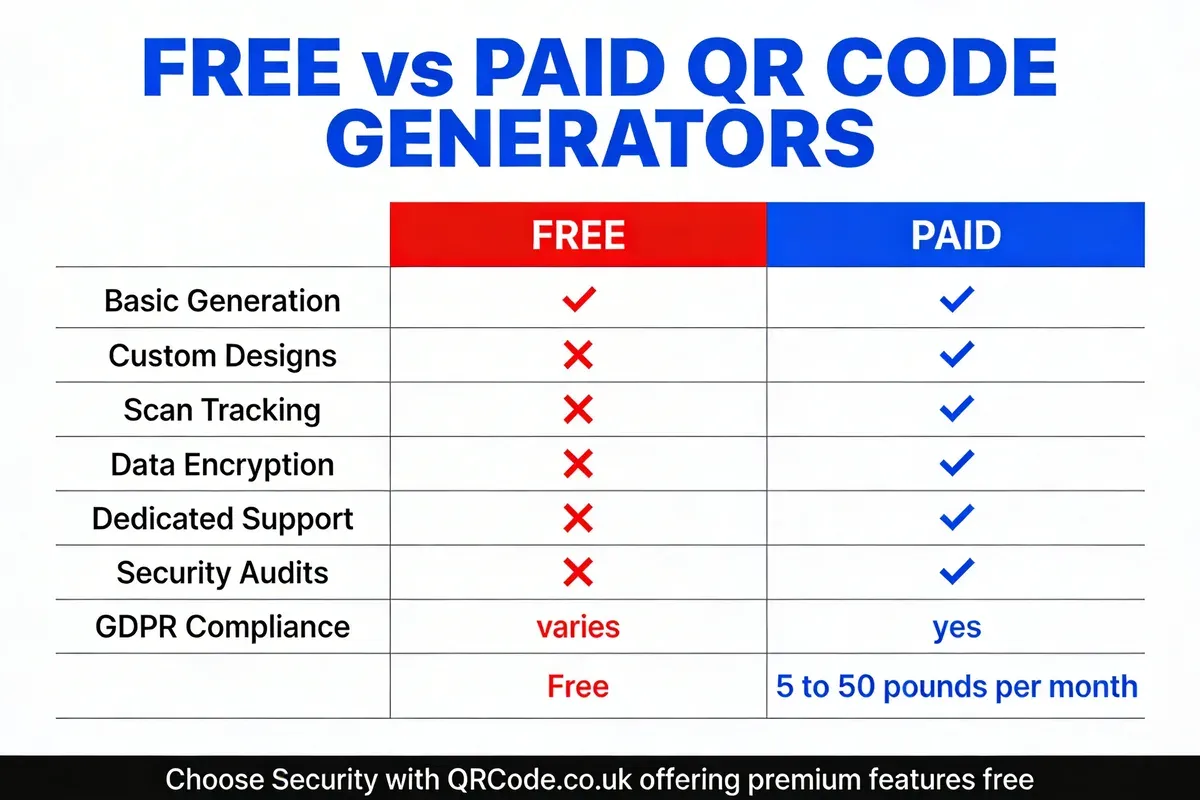
| Feature | Free Generators (Typical) | Paid/Premium Generators |
|---|---|---|
| Static QR code creation | Yes | Yes |
| Dynamic QR codes | Limited or none | Full support with editing |
| Custom design and branding | Basic or none | Full colour, logo, shape customisation |
| Scan analytics and tracking | Rarely available | Detailed dashboards |
| Data encryption | Varies widely | Standard |
| GDPR compliance | Often unclear | Documented and audited |
| Dedicated support | Forum or none | Email, chat, phone |
| Security audits | Unlikely | Regular third-party audits |
| QR code expiration | Some codes expire | Non-expiring codes |
| Hidden redirects | Possible | Direct linking guaranteed |
When Free Generators Are Perfectly Fine
Static QR codes for non-sensitive purposes work well with reputable free generators. Linking to your public website, sharing a Wi-Fi password at an event, or encoding a plain-text message carries minimal risk because the data is baked directly into the QR pattern.
According to QR Codes Unlimited's safety assessment, most free QR code generators are completely safe to use, though caution in choosing the right platform still matters.
When You Should Pay (or Choose a Trusted Free Option)
Dynamic QR codes, business-critical campaigns, and anything involving personal data deserve a higher standard. If you're printing codes on physical materials (packaging, menus, business cards, signage), you need confidence that the destination won't change and that the codes won't expire. We built QRCode.co.uk specifically to address this gap: free QR codes that don't expire, with UK-based data protection and no hidden redirects.
How to Verify a Safe QR Code Generator
Verifying a QR code generator's safety takes about five minutes. These five checks will tell you whether a tool is trustworthy or whether you should walk away.
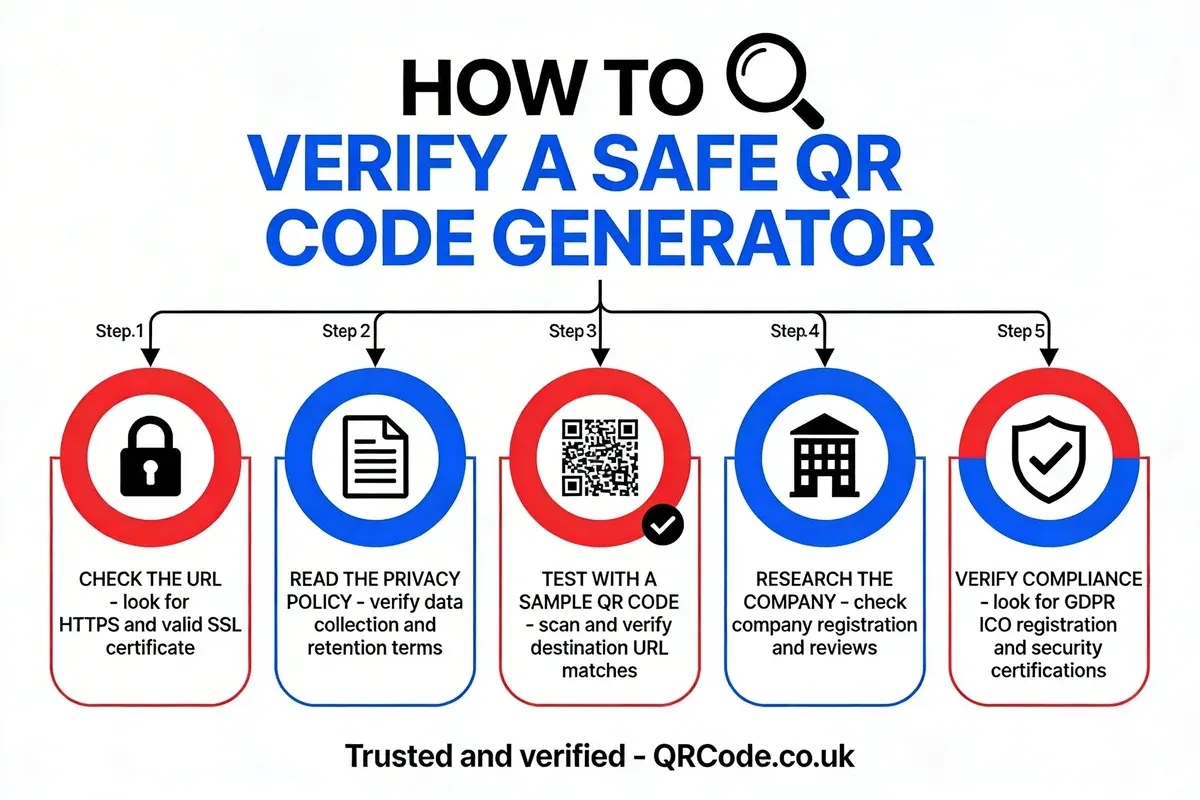
- Check HTTPS and SSL: Load the generator's website and confirm the URL starts with
https://. Click the padlock to inspect the certificate. Valid certificates from recognised authorities (Let's Encrypt, DigiCert, Sectigo) confirm the connection is encrypted. - Read the privacy policy: Search for specific answers: Do they sell data? How long do they keep it? Can you delete your account data? Generators operating under GDPR (UK, EU) or CCPA (California) must provide this information clearly.
- Test with a sample QR code: Generate a test code pointing to a URL you control. Scan it with your phone. Does it go directly to your URL, or does it pass through an intermediate redirect? Check the browser's address bar during the redirect chain.
- Research the company: Look for a registered business name, physical address, and identifiable team. Check Companies House (UK), Better Business Bureau (US), or equivalent registries. Search for reviews on Trustpilot, G2, or Reddit.
- Verify regulatory compliance: For UK businesses, check the ICO register of fee payers to confirm data protection registration. EU-based generators should reference their Data Protection Officer contact details.
Red Flags That Signal an Unsafe Generator
Watch for these warning signs during your verification:
- No HTTPS: Immediately disqualifying in 2026
- Vague privacy policy: "We may share data with partners" without specifying who
- Forced account creation: Requiring login for basic static codes suggests data collection motives
- Aggressive advertising: Pop-ups, interstitials, and auto-play videos indicate ad-revenue-driven models
- No company information: Anonymous operators with no legal entity
- QR codes that expire: Forces you back to the platform, creating dependency
- Hidden redirect URLs: Scan your generated code and check if it passes through a tracking domain
Best Practices for Using QR Codes Securely
Security isn't just about choosing the right generator. How you create, distribute, and maintain your QR codes matters just as much. These practices apply whether you're a small business owner printing menus or a marketing team running a national campaign.
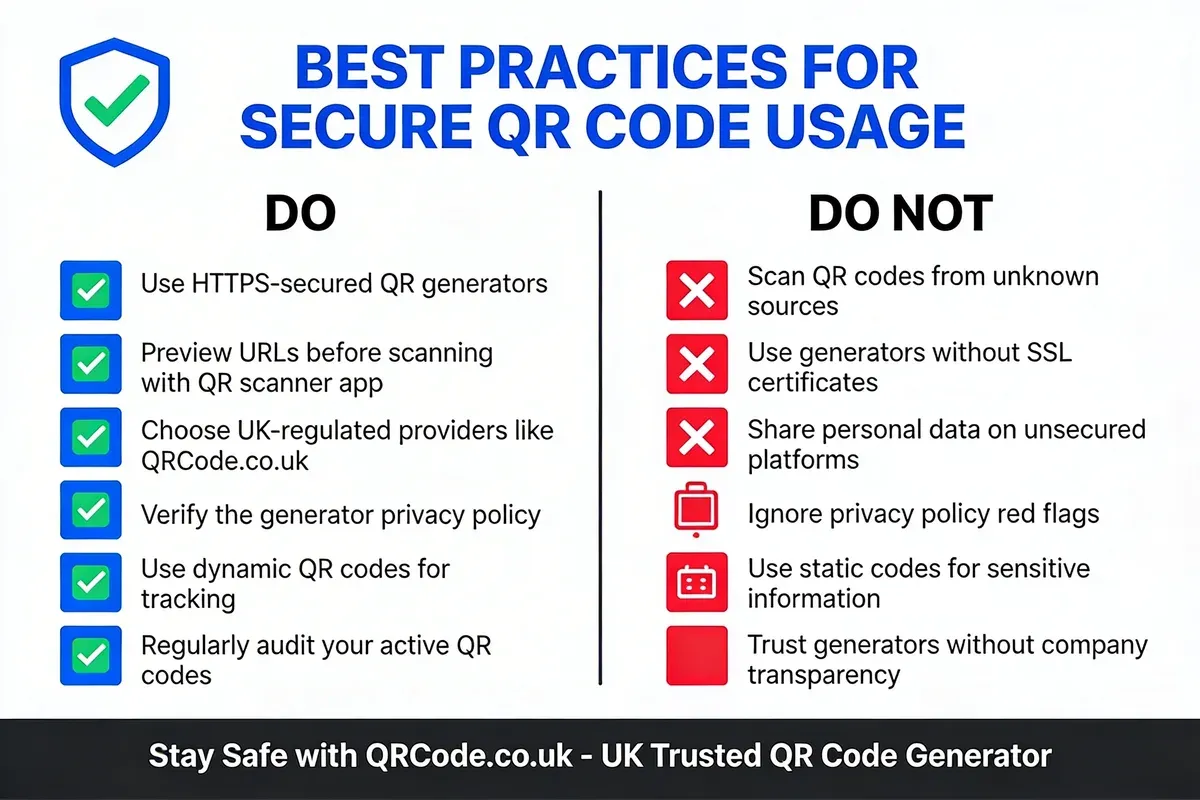
For QR Code Creators
- Always test before distributing: Scan every code with at least two different devices before printing or publishing. Verify the full redirect chain and final destination.
- Use HTTPS destinations: Your QR code's target URL should use HTTPS. Linking to HTTP pages exposes scanners to man-in-the-middle attacks.
- Keep landing pages updated: A QR code pointing to a 404 error or outdated content wastes scans and damages trust. If you can't update the destination, use dynamic codes.
- Add context around physical codes: Print QR codes with clear labels explaining what scanning will do. "Scan to view our menu" is better than a bare code with no context. Users are more likely to scan codes when they understand the purpose.
- Monitor scan analytics: If your generator offers tracking, review scan patterns regularly. Unexpected spikes in scans from unusual locations could indicate your code has been copied or shared in an unintended context.
- Use password protection for sensitive content: When QR codes link to confidential documents or restricted areas, add a password protection layer so that scanning alone isn't enough to access the content.
For QR Code Scanners
- Preview the URL before visiting: Most modern phone cameras show a URL preview when you point at a QR code. Read it before tapping. If the domain looks suspicious, don't proceed.
- Don't scan codes in unexpected locations: A QR code stuck over an existing one on a parking meter, restaurant table, or public poster could be a quishing attempt. Look for signs of tampering.
- Use your phone's built-in scanner: Third-party QR scanner apps sometimes inject their own tracking or advertising. Both iOS and Android have reliable built-in QR code scanning through the default camera app.
- Never enter credentials after scanning: If a QR code leads to a login page, close the browser and navigate to the service manually. Legitimate services almost never require login through QR code redirects.
For Businesses and Organisations
Enterprise use of QR codes requires additional safeguards. Establish a company-wide policy for QR code generation that specifies approved generators, required security features, and review processes before codes go into production. I've seen businesses lose money and reputation because different departments used different generators with inconsistent security standards.
Consider centralising QR code management under your marketing or IT team. This ensures consistent branding, proper tracking, and a single source of truth for all active codes. Tools like QRCode.co.uk provide scan analytics and customisation that help maintain control at scale.
Why Choose a UK-Based QR Code Service
Where a QR code generator is based determines which laws protect your data. For UK businesses and individuals, a UK-based service provides specific legal and practical advantages that offshore alternatives can't match.
UK Data Protection Framework
The UK GDPR and Data Protection Act 2018 give individuals specific rights over their personal data that many other jurisdictions don't enforce. A UK-based QR code generator operating under this framework must:
- Respond to Subject Access Requests within 30 days
- Report data breaches to the ICO within 72 hours
- Appoint a Data Protection Officer if processing data at scale
- Maintain detailed records of data processing activities
- Conduct Data Protection Impact Assessments for high-risk processing
These aren't voluntary guidelines. They're legal obligations with enforcement powers backed by fines of up to 4% of annual global turnover. That's a strong incentive for UK-based generators to take data protection seriously.
Practical Advantages for UK Businesses
Beyond legal compliance, UK-based services offer practical benefits. Support operates in your timezone. Customer service representatives understand UK business practices and regulatory requirements. If a dispute arises, you have recourse through UK courts rather than navigating international legal systems.
For businesses processing customer data through QR codes (restaurant ordering, event check-ins, loyalty programmes), using a UK-based generator simplifies your own GDPR compliance. Your data processing chain stays within a single regulatory framework, reducing the complexity of data protection impact assessments.
How QRCode.co.uk Addresses These Requirements
We built QRCode.co.uk as a UK-registered company specifically because we saw the gap between what businesses needed and what most free generators offered. Our QR code platform provides free generation without expiration, SSL-secured data transmission, and transparent data handling under UK GDPR.
As a UK-based company, we're registered with the ICO and subject to UK data protection law. That's not a marketing claim. It's a verifiable legal obligation. You can check our approach to QR code safety and audit our privacy practices against the standards outlined in this article.
Common Mistakes When Choosing a QR Code Generator
After working with thousands of users and reviewing hundreds of generators, these are the mistakes I see most often. Each one is avoidable with basic due diligence.
- Trusting the first Google result: Search rankings don't indicate security quality. Some of the most visible free generators have the weakest privacy practices. Always run your own verification checks rather than assuming top-ranking means top-quality.
- Ignoring the free-to-paid transition: Some generators offer generous free tiers initially, then restrict access or introduce expiration dates. Codes you've already printed on packaging or business cards suddenly stop working unless you upgrade. Confirm the terms of the free tier before committing to physical materials.
- Skipping the privacy policy: "I never read those" is understandable but risky. You don't need to read every word. Search for "sell," "share," "third party," and "retain." These keywords reveal the most important terms in under two minutes.
- Using personal information in QR codes unnecessarily: Don't encode your email address, phone number, or home address in a QR code that will be publicly displayed unless you genuinely need to. Use a business contact or landing page instead.
- Not scanning your own codes: The single most effective safety measure is also the simplest. Scan every code before distributing it. Verify the destination, check for redirects, and test on multiple devices. This five-second check prevents the vast majority of QR code problems.
Real-World QR Code Safety Incidents
Theory matters less than what actually happens. These cases illustrate how QR code safety failures play out in practice.
The $500 Marketing Materials Loss
A small business printed 5,000 flyers with QR codes generated through a free tool. Weeks later, the generator's terms changed, and the QR codes redirected to an unrelated page. The business lost $500 in printing costs and an unmeasurable amount in missed customer engagement. Dynamic codes from free generators created this vulnerability because the redirect was controlled by the third-party platform.
Hidden Redirects on a Design Portfolio
A graphic designer created QR codes for client projects using a free generator. During a portfolio review, the designer discovered the codes were routing through the generator's tracking server, adding a 2-3 second delay and occasionally serving interstitial ads before reaching the client's website. The designer's professional reputation was at stake because the QR codes appeared to be serving ads.
Parking Meter Quishing in UK Cities
Multiple UK councils reported incidents where criminals placed fake QR code stickers over legitimate parking meter codes. Scanners were redirected to phishing pages that collected payment card details. The councils had to replace physical signage and issue public warnings. This incident highlights that even legitimate QR codes can be exploited after deployment, which is why the QR code scam recognition process matters as much as choosing a safe generator.
QR Code Safety for Specific Use Cases
Restaurant Menus and Hospitality
Post-pandemic, QR code menus became standard in UK restaurants and pubs. For this use case, static QR codes pointing directly to a hosted menu PDF or web page are safest. There's no need for dynamic codes or tracking. The code should be printed on branded material (not a handwritten sticker) and link to an HTTPS page on the restaurant's own domain.
Business Cards and Professional Networking
QR codes on business cards typically encode vCard contact information or link to a LinkedIn profile. Since this data includes personal details, use a generator that doesn't store the encoded data on their servers. Static vCard codes are ideal here because the contact information lives entirely within the QR pattern. Check out our guide to the best QR code generators for small businesses for options that prioritise privacy in professional contexts.
Marketing Campaigns and Print Advertising
Campaigns printed on physical media need reliable, non-expiring codes. Test extensively before committing to a print run. Consider using a QR code solution designed for enterprise adoption, which includes features like scan analytics, A/B testing, and guaranteed uptime that free generators typically don't provide.
For any QR code that will be printed on physical materials, test it across at least three different devices, verify the full redirect chain, and confirm the code won't expire. The cost of reprinting materials always exceeds the cost of using a reliable generator from the start.
Frequently Asked Questions on QR Code Safety
Can you trust a QR code generator?
What are the risks of QR code generators?
Is online QR code generation free and safe?
Is there a 100% free QR code generator?
How do you choose a safe QR code generator in 2026?
Are QR codes secure for business use?
Staying Safe: The Bottom Line
Free QR code generators can be safe when you know what to look for and what to avoid. Static generators carry minimal risk for everyday use. Dynamic generators require more scrutiny because they maintain ongoing control over your QR code's destination through their servers.
The five-minute verification process outlined above (HTTPS, privacy policy, test scan, company research, regulatory check) eliminates the vast majority of unsafe generators from consideration. Apply it consistently, and you'll avoid the horror stories of redirected codes, expired links, and harvested data.
For UK businesses and individuals, choosing a UK-based generator adds a layer of legal protection that offshore services can't provide. UK GDPR, ICO registration, and British consumer protection law create accountability structures that meaningfully reduce your risk exposure.
I've spent years building and testing QR code solutions, and the single most important piece of advice is this: scan your own codes before distributing them. Always. Every time. That one habit prevents more problems than any checklist ever could.